See it in action
A 30-second look at the KT8 DNS checker.
The video plays from YouTube once you press play. Nothing loads from YouTube before then. Watch on YouTube
Why businesses check their DNS
A few small records decide whether your emails arrive, whether anyone can pretend to be you, and whether your website stays online.
Emails that reach the inbox
Gmail, Outlook and Yahoo now expect SPF, DKIM and DMARC, and send email without them to spam or turn it away. We show you which you have, and write the ones you’re missing.
Stop people sending as you
Without the right records, anyone can send email that looks like it came from your domain. We show you how to shut that door, step by step.
Don’t lose your domain
We check when your domain is due for renewal and whether it’s locked against transfer, so a missed renewal or a stolen domain doesn’t take your website and email with it.
A report you can act on
No jargon to decode and nothing to look up.
- A score out of 10, and the records that need fixing first.
- For each one, the exact record to add, ready to copy.
- Step-by-step instructions for your DNS company, such as Cloudflare, GoDaddy, 123 Reg or IONOS.
- Share a private link with your developer or IT provider. It stops working after 7 days.
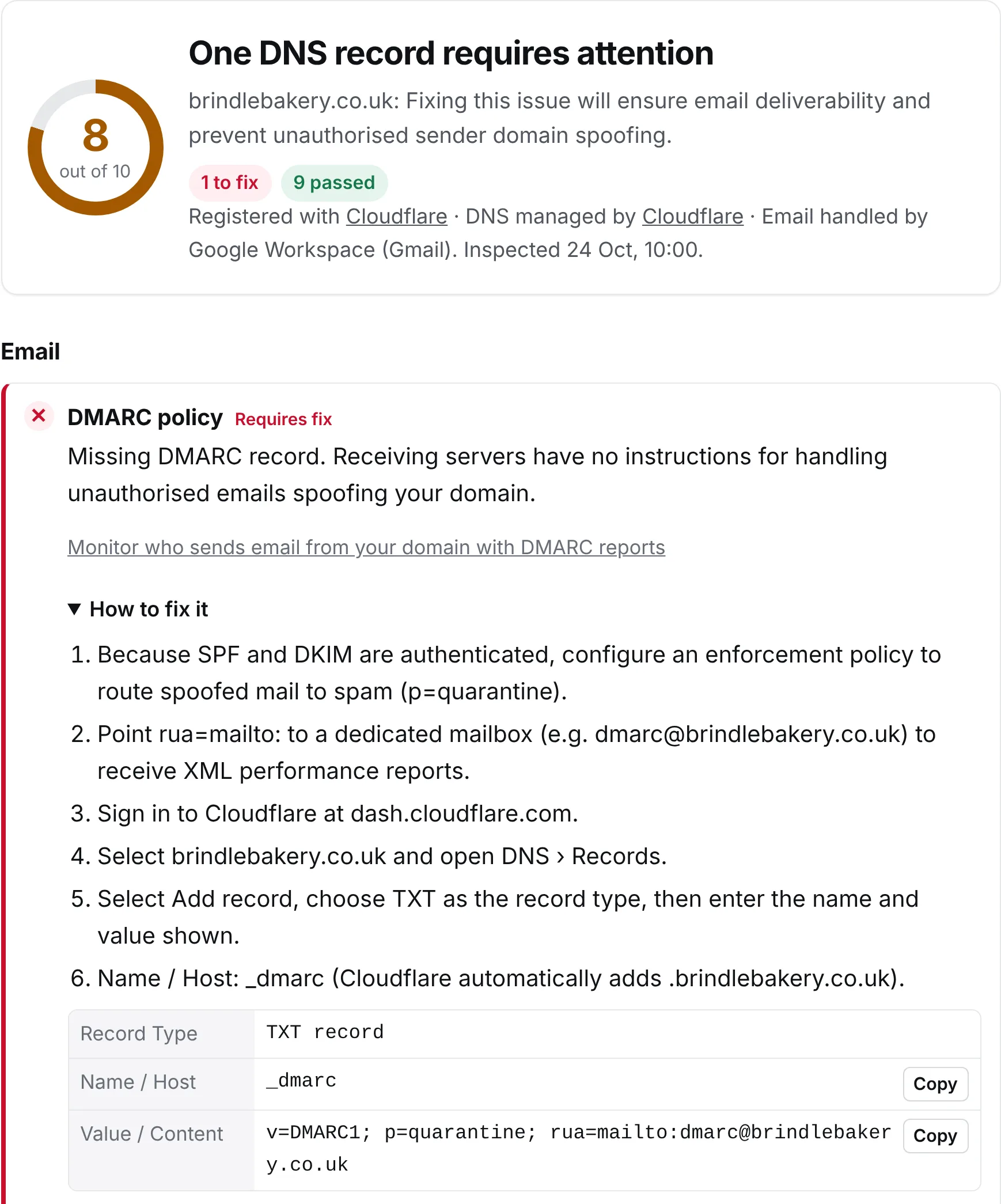
Everything one check covers
Your email records, your domain and your website, in a single report.
SPF, DKIM and DMARC
Who’s allowed to send as you, whether your emails are signed, and what happens to email that isn’t. We try the usual DKIM selectors for you.
Mail servers
Where your email is delivered, and who handles it, such as Google Workspace, Microsoft 365, Fastmail or Proton Mail.
Website records
Whether your domain and its www address point at a web server, and which companies may issue security certificates for it (CAA).
Renewal and transfer lock
When your domain is due for renewal, who you bought it from, and whether it’s locked so nobody can move it without you.
DNSSEC
We follow the signatures from the root down to your domain, and tell you in plain English if the chain is broken.
Blocklists
Your domain and mail servers against 18 well-known blocklists, with how to get off any you’re on.
MTA-STS and BIMI
Whether mail to you must travel encrypted, and whether your logo can show beside your emails, mark certificate included.
Your DNS company
Who runs your DNS, so our steps match the control panel you’ll actually use.
Domains that don’t send email
For a parked domain, the two records that stop anyone sending email in its name.
More DNS tools, in the same place
Use the tabs at the top of the page.
Record builders
Answer a few questions and we write your SPF, DMARC or MTA-STS record, ready to copy. It runs in your browser. Build a record
Moving email provider
A step-by-step checklist for moving your email to a new provider, with a live check at each step. Plan your move
Look up a record
Ask Cloudflare, Google and Quad9 at once, to see whether a change has reached everyone yet. Look up a record
Read email headers
Paste an email’s headers to see the route it took, how long each hop took, whether it passed SPF, DKIM and DMARC, who signed it and any spam scores. They never leave your browser. Read headers
What KT8 Monitor adds KT8 Monitor
The DNS checker runs when you press the button. KT8 Monitor keeps checking your domains for you, and tells you the moment something changes.
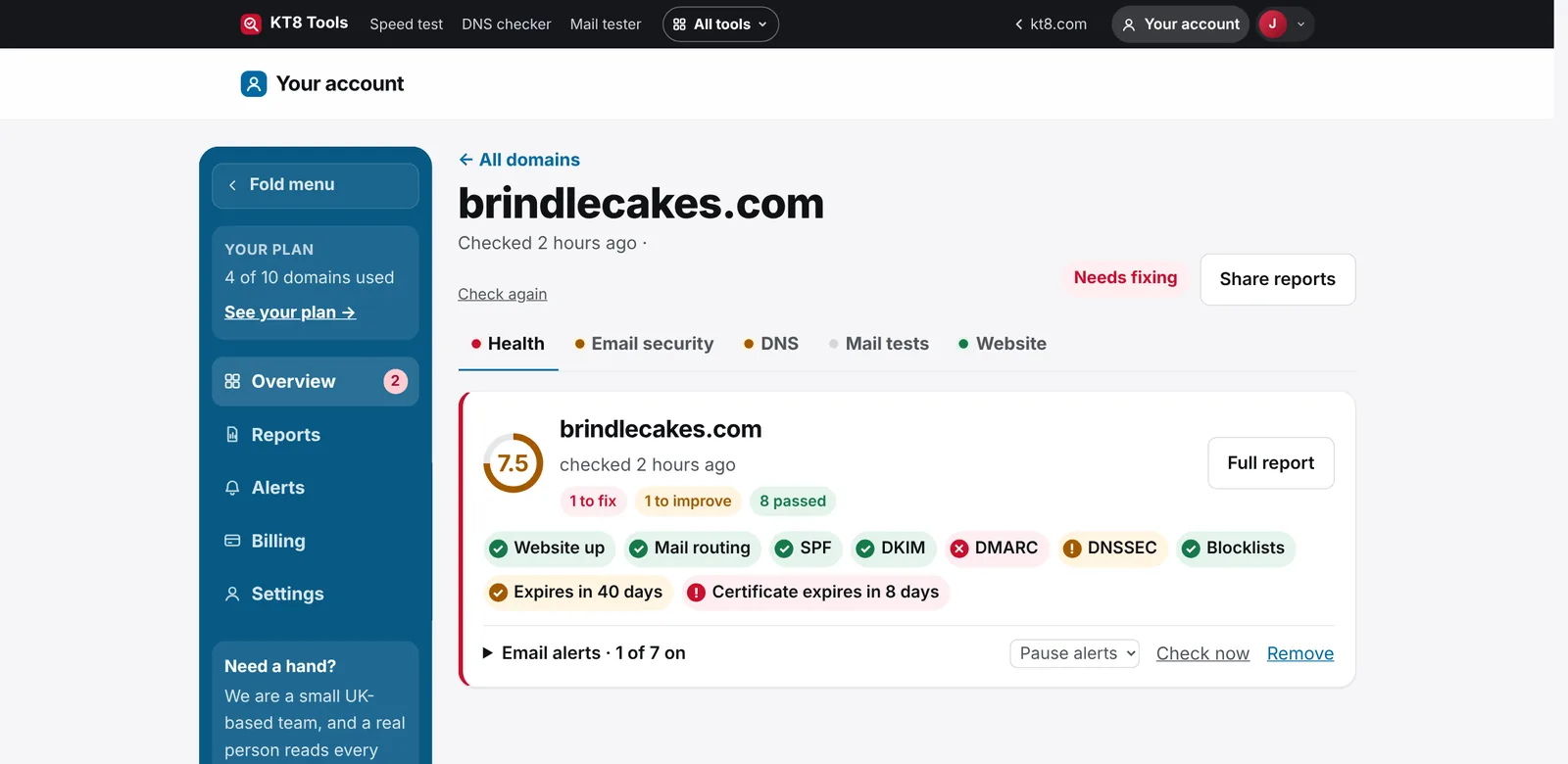
- DNS records and blocklists checked every 6 hours, with an email if anything changes or starts failing.
- Your website visited every 5 minutes, with an alert if it fails twice in a row.
- Domain renewal and certificates, with reminders before either runs out.
- Dangling records: subdomains still pointing at a cloud service you’ve closed, checked every day.
- Fix it in one press: connect Cloudflare and we make the fixes we recommend, with 30 days to undo them.
Fix your DNS in a few minutes
You don’t need to know how DNS works.
Type your domain
Or a web address or email address on it. The check takes a few seconds.
Copy the fix
For anything that needs fixing, copy the record we give you into your DNS company’s control panel, following our steps for your company.
Check again
Press Re-check domain. Most changes show within a few minutes.
How we compare with MxToolbox
MxToolbox is a long-standing set of DNS and email tools. Here’s an honest side-by-side, checked in October 2026.
| Feature | KT8 DNS checker | MxToolbox |
|---|---|---|
| SPF, DKIM, DMARC, MX and DNSSEC checks | Yes | Yes |
| Look up any record type | Yes | Yes |
| Email header analyser | Yes | Yes |
| MTA-STS policy check | Yes | Yes |
| Plain-English fix steps for your DNS company | Yes | No |
| Headers stay in your browser | Yes | No |
| Blocklists checked | 18 | 100+ |
| Mail server (SMTP) test | No | Yes |
| Ongoing blocklist monitoring | With KT8 Monitor | Yes |
- A modern, simple design that works well on your phone
- Built on 25 years’ experience in email delivery
- Plain English, with no jargon to decode
- Private by design: we never sell your data, and only people you send a share link to can see a report
- Pay in your local currency: sterling, euros or US dollars
MxToolbox is a trademark of its owner. KT8 isn’t linked to MxToolbox in any way.
What’s included
Free for everyone, with more checks every day on a free account. KT8 Monitor keeps checking every domain for you.
- 10 checks a day without an account
- 50 checks a day with a free account
- Every check runs live, with plain-English fixes
- A report link to share with your web designer
Need high volume testing? We set up custom plans. Talk to us
Questions
Is the DNS checker free?
Yes. You can run 10 checks a day without an account, and 50 a day with a free account. Need high volume testing? We set up custom plans.
Does it keep checking my domain?
No. Every check runs live when you press the button, and nothing is watched or emailed afterwards. To have your records checked every 6 hours, with an email when one changes, add the domain to KT8 Monitor.
How long do DNS changes take to show?
Usually a few minutes. Some DNS companies take up to a few hours, because older answers are kept for a while. Use Look up a record to see whether Cloudflare, Google and Quad9 have the new answer yet.
What’s a DKIM selector, and do I need one?
It’s the first part of the name of your DKIM record, such as google in google._domainkey. You can leave it blank: we try the ones the big email providers use. If yours isn’t found, your email provider’s help pages will say what it is.
Can I check a domain I don’t own?
Yes. DNS records are public, so you can check a supplier’s or a client’s domain.
Who can see my report?
Only you, and anyone you send a share link to. Share links stop working after 7 days. We never sell your data.
Can I use it under my own brand?
Yes. On an agency plan, the DNS checker and every other KT8 tool run on your own web address with your logo and colours. See the agency edition.