Why businesses use a status page
When your website or a service goes down, the hour that follows decides whether customers lose patience or trust you more.
Fewer “is it down?” emails
Customers check one page instead of emailing and calling, so your team can fix the problem rather than answer the same question all day.
Look in control
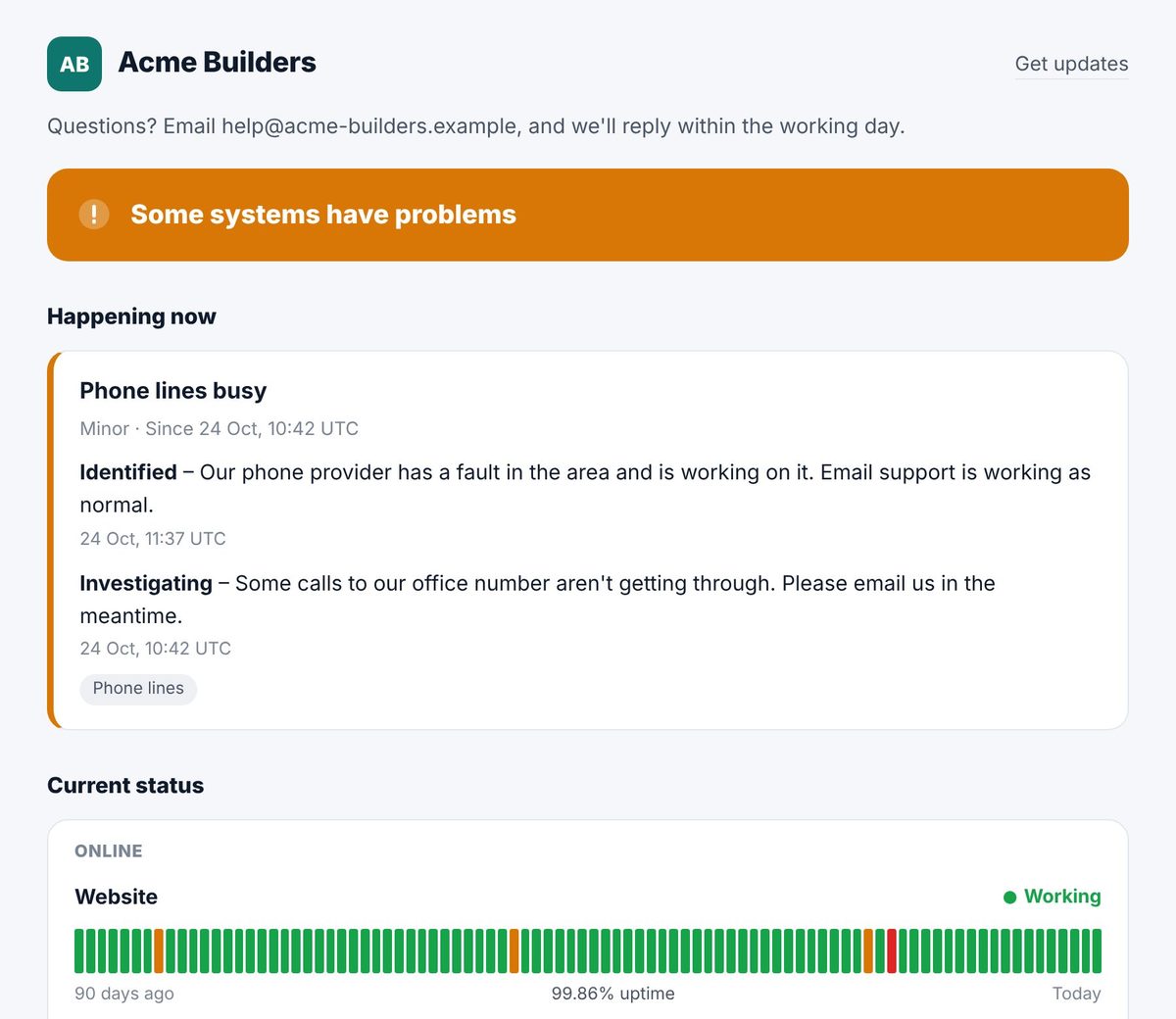
A clear page in your name and colours shows you know about the problem, what you’re doing about it and when you’ll say more. It also shows 90 days of uptime.
Nothing to maintain
We host the page and keep it up to date from our website checks every 5 minutes. There are no servers, plugins or code, and it keeps running when your own website doesn’t.
What your status page does
For businesses that want to be open with customers when things go wrong, and agencies that look after their clients’ websites.
Follows your website checks
Each part of your service can follow one of your websites in My domains. We visit every 5 minutes, and the page shows 90 days of uptime for each one.
Incidents open by themselves
When a website fails two visits in a row (about 10 minutes), the page says so and opens an incident. When it answers again, the incident closes with how long it was down.
Post your own updates
Write incidents in plain words, mark where things are up to, and post updates as you go. Parts set by hand, such as phone lines, show what you choose.
Planned maintenance
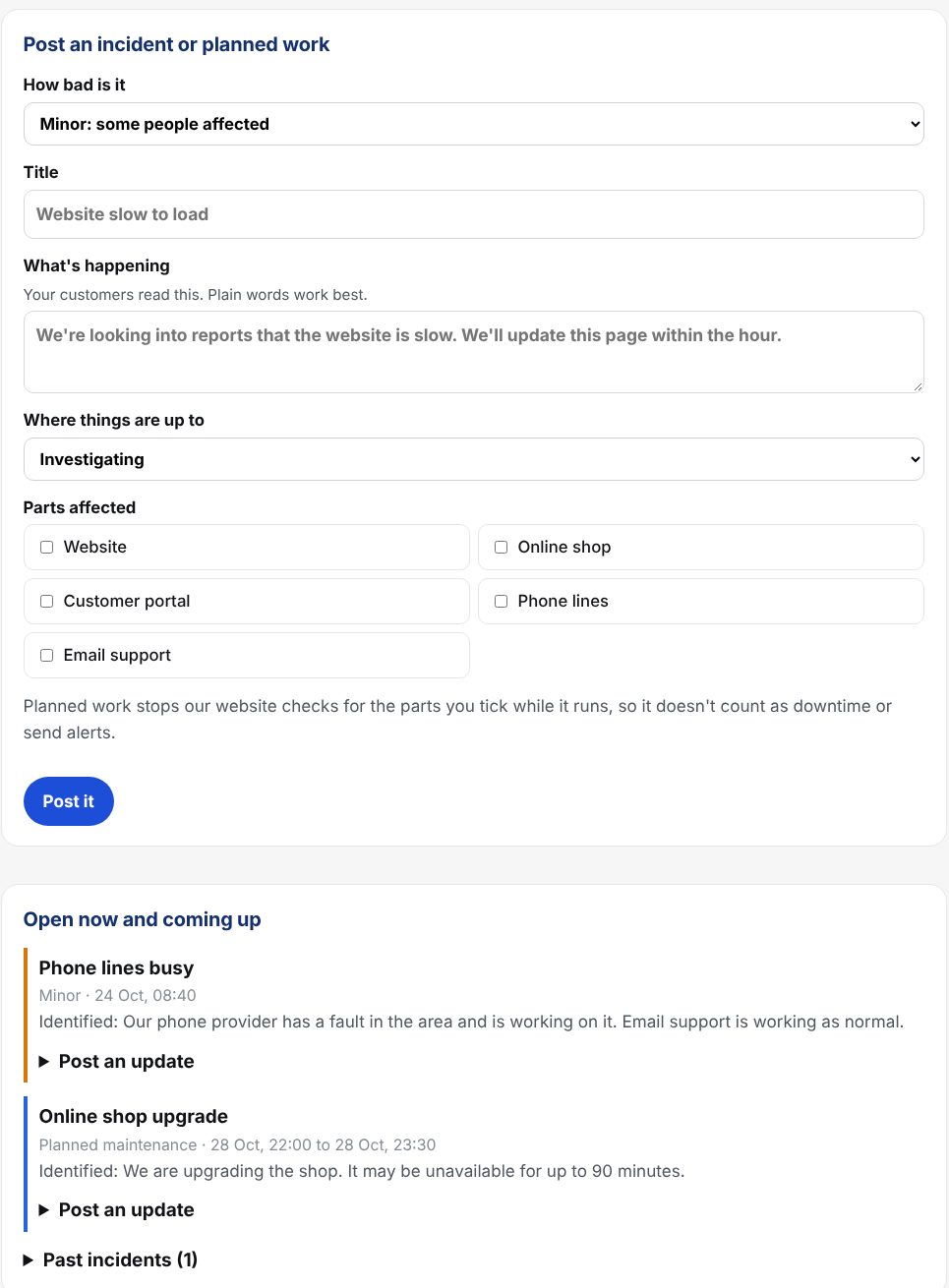
Tell customers about work before it starts. While it runs, our checks pause for the parts it covers, so it doesn't count as downtime or send you alerts.
Email updates for your customers
Customers subscribe on the page and confirm by email. They hear about every incident and planned work, and each email has a one-click unsubscribe.
RSS feed
Every page has a feed for feed readers, and for Slack or Teams channels that can follow one.
A badge for your website
Copy one line into your website or help centre, and a small badge shows your current status and links to the page.
Your name, colours and address
Add your logo and colour, and put the page on your own address, such as status.yourcompany.com. We look after the security certificate.
Private by design
No cookies or trackers on the page. Subscribers' addresses are only used for updates, never shared, and deleted when they unsubscribe or you delete the page.
“KT8 takes the guesswork out. Having speed tests, DNS checks and email deliverability checks together, under one clean, privacy-first roof, saves us hours every month. It’s reliable, intuitive and genuinely built for people who care about how the web should work.”
Post an update in seconds
Write it once, and it reaches everyone who needs to know.
- Choose how bad it is, write a line in plain words and tick the parts affected.
- Post updates as things move on, and mark it resolved when it’s fixed.
- Your subscribers get each update by email, and the page changes within a minute.
- When our checks spot a website down, the incident is opened for you.
Set it up in a few minutes
Everything is on the Status pages tab of your KT8 account.
Add your websites to My domains
If you haven’t already, add your domains on the My domains tool. Their website checks are what keep the page up to date.
Make the page
Open Status pages in your account, give the page a name and tick the websites to show. You can rename them, put them in groups and add parts you set by hand.
Make it yours
Add your logo, colour and a line about how to reach you. Use Preview to see it before you share it.
Share the address
Your page is ready at yourname.kt8status.com. Link to it from your website, help pages and email signature, or add the badge.
Use your own address
On Business and above, put the page on a subdomain of your own, such as status.yourcompany.com.
Choose the address
Under Your own address on the page’s settings, type the address you’d like and press Use this address.
Add one DNS record
Where your domain’s DNS is managed, add the CNAME record we show you. If your DNS is on Cloudflare, leave it as DNS only (grey cloud).
We do the rest
It usually goes live within 15 minutes, with its own security certificate. Press Check now to see how it’s getting on.
Which plans include it
Status pages come with every KT8 Tools plan, at no extra cost.
| Plan | Status pages |
|---|---|
| Solo | 1 page, at yourname.kt8status.com |
| Business | 3 pages, on your own address if you like |
| Business Plus | 10 pages, and you can remove the “Status page by KT8 Tools” line |
| Agency plans | A page for every client domain, on your portal address or your client’s, with no mention of KT8 |
| Free trial | 3 pages while your trial runs |
Questions
How quickly does the page show a problem?
We visit each website every 5 minutes. When a site fails two visits in a row, about 10 minutes after it stops answering, the page shows it as down and opens an incident. You can also post an incident yourself at any time.
Can I turn off automatic incidents?
Yes. Untick “Open an incident by itself when a website stops answering” under Look and settings. The page will still show each website’s status and uptime.
How do email updates work?
Customers type their address on the page and confirm it from the email we send. After that they get an email for each new incident, planned work and update, from your page’s name. Every email has a one-click unsubscribe. A page can have up to 1,000 subscribers.
Can I post an update without emailing everyone?
Yes. When you post an update, untick “Email subscribers” for a small correction. You can also switch email updates off for a page altogether.
Can I see who has subscribed?
Yes. Open Subscribers, feed and badge on the page’s settings to see confirmed addresses and remove anyone. We never use the addresses for anything else, and we delete unconfirmed sign-ups after 7 days.
How do I add the badge to my website?
Copy the line under “Badge for your website” and paste it into your page, footer or help centre. It shows your current status and changes by itself within a minute or so.
Will search engines list my status page?
Not unless you want them to. Pages ask search engines not to list them until you tick “Let search engines list this page”.
What happens if my plan ends?
The page stays at its address but shows that it’s paused, and no emails are sent. Choose a plan and it comes straight back with its history.
I’m an agency. What do my clients see?
Your clients’ pages carry your client’s name and logo, live on your portal address or your client’s own, and never mention KT8. Email updates come from your own address once your sending domain is set up in your partner portal.