KT8 MonitorStatus pages
A status page that keeps customers in the loop, and updates itself.
When your website or a service goes down, the hour that follows decides whether customers lose patience or trust you more. A clear page in your name shows you know about the problem, what you’re doing about it and when you’ll say more.
For businesses that want to be open with customers when things go wrong and agencies that look after their clients’ websites.
At a glance
- 1 page on Solo, 5 on Business, 20 on Business Plus
- On your own address, such as status.yourcompany.com
- Your logo and colour, with no KT8 name
- Incidents open and close by themselves
- Subscribers emailed when a problem is fixed
- 90 days of uptime for each part
Nothing to keep up to date.
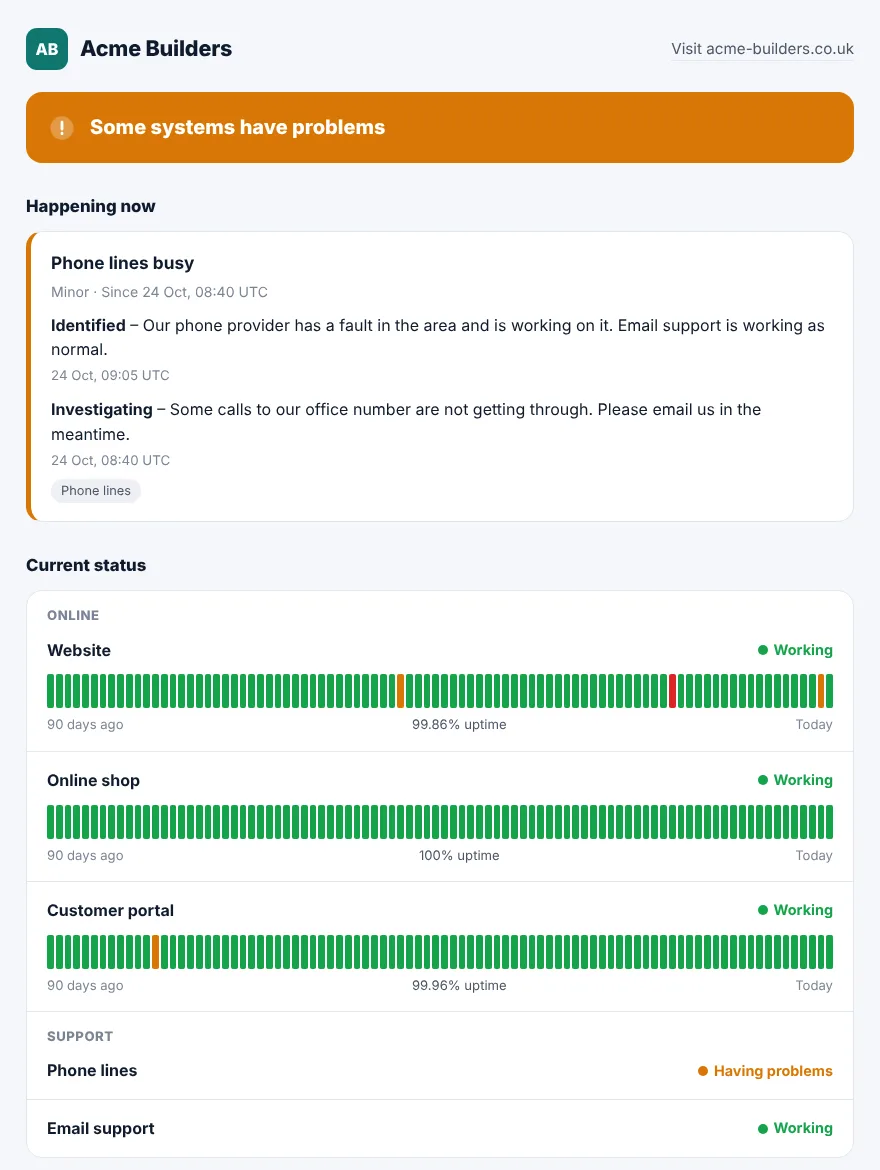
Each part of your page can follow one of your monitors. When a website fails two checks in a row, the page says so and opens an incident. When it answers again, the incident closes with how long it was down.
Parts set by hand, such as phone lines or email support, show what you choose. We host the page, so it keeps running when your own website doesn’t.
Post an update in seconds.
Choose how bad it is, write a line in plain words and tick the parts affected. Post updates as things move on, and mark it resolved when it’s fixed. The page changes within a minute.
- Planned maintenance: tell customers about work before it starts. While it runs, checks pause for the parts it covers.
- Turn off automatic incidents if you’d rather post them all yourself.
Investigating
Some calls to our office number are not getting through. Please email us in the meantime.
Identified
Our phone provider has a fault in the area and is working on it.
Resolved
Website is working again. It was unavailable for about 2 hours 30 minutes.
Fewer “is it down?” emails.
Customers leave their address on the page and confirm it. When an incident is resolved, they get one email to say so, from your page’s name, with a one-click unsubscribe. No emails for every update along the way.
- Up to 100 subscribers a page on Solo, and 500 on Business and Business Plus.
- An RSS feed for feed readers, and for Slack or Teams channels that can follow one.
- A small badge for your website or help centre that shows your current status.
Private by design
No cookies or trackers on the page. Subscribers’ addresses are only used for updates, never shared, and deleted when they unsubscribe.
Your own address and branding.
Add your logo and colour, and put the page on a subdomain of your own, such as status.yourcompany.com. Add one CNAME record where your DNS is managed, and it usually goes live within 15 minutes. We look after the security certificate.
Your status page record
Name: status, type CNAME
Frequently asked questions.
How quickly does the page show a problem?
When a site fails two checks in a row: about 10 minutes on Solo, and about 2 minutes on Business and Business Plus. You can post an incident yourself at any time.
Will my customers get lots of emails?
No. Subscribers only get an email when an incident is resolved. When you resolve one by hand, you can untick Email subscribers if it was a false alarm.
Will search engines list my status page?
Not unless you want them to.
Everything else that comes with KT8 Monitor.
No card needed. We’ll email you 3 days before your trial ends.