KT8 MonitorServers and scheduled jobs
Watch the servers and jobs your business runs on.
Not everything that matters is a web page. We check that your mail servers answer and that encryption works, and we give each backup, data import or cron job its own heartbeat URL. If something stops, we alert you.
For businesses that run their own mail server or apps and IT providers who look after servers and scheduled jobs for clients.
At a glance
- Mail servers for sending and reading mail
- We never sign in, so we never need a password
- Heartbeats from every 5 minutes to once a week
- An alert when a job misses its slot
- Web apps and login pages with your own rules
- Every check counts as one monitor
Check your mail servers answer, securely.
We connect to your mail server the way a mail app does, read its greeting and check that encryption works. We never sign in, so we never need a password.
- Sending mail: port 587 (SMTP submission) and 465 (SMTP over TLS).
- Reading mail: port 993 (IMAP over TLS), 143 (IMAP), 995 (POP3 over TLS) and 110 (POP3).
- An alert if the certificate has expired, doesn’t match the server’s name or isn’t trusted.
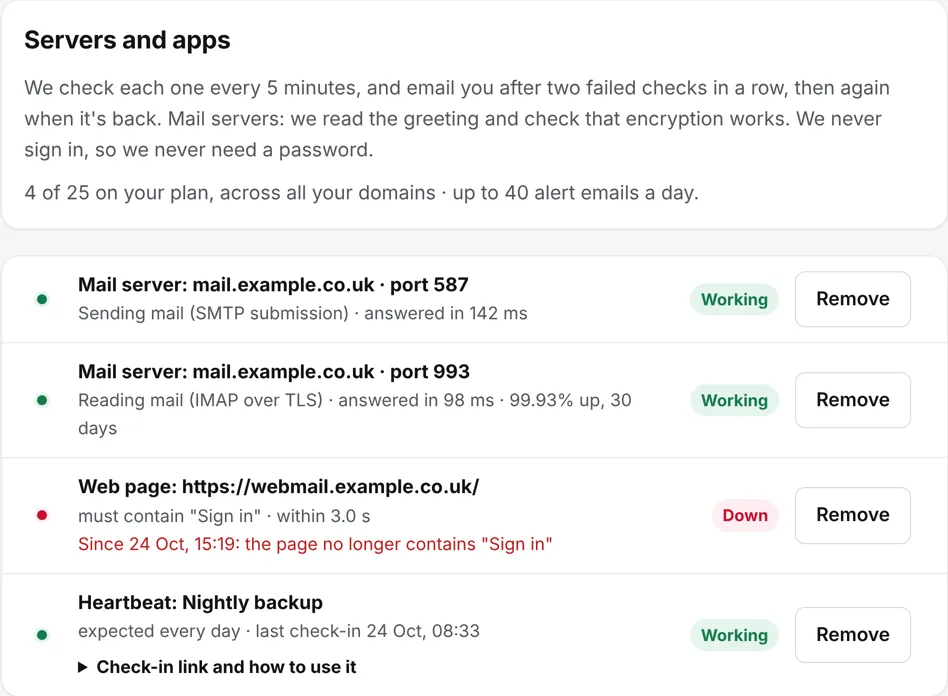
Know when a backup or scheduled job doesn’t run.
A nightly backup can stop without anyone noticing, or an import may never run. Give each job its own heartbeat URL, and have the job call it when it finishes. If it misses its slot, we alert you.
- Choose how often the job runs: every 5, 15 or 30 minutes, hourly, every 6 hours, daily or weekly.
- We allow a little extra time: a tenth of the interval, and at least 5 minutes.
- Call the URL with GET, POST or HEAD, from any script, server or cloud service.
Add one line to the end of your job
For example, in a backup script:
Login pages and webmail, checked properly.
Watch any page on your domain or its subdomains, such as a login page, webmail or customer portal. Add rules for the status code, words the page must or must not contain and how long it may take.
Example rule
Webmail must contain “Sign in” and answer within 3 seconds.
Frequently asked questions.
How often are servers checked?
Every 5 minutes on Solo, and every minute on Business and Business Plus, the same as websites.
Can you check port 25?
Not yet. Checks on port 25, where other mail servers deliver to yours, are coming soon.
Our firewall blocks your checks. What can we do?
We show you the fixed addresses our checks come from, so you can let them through.
Everything else that comes with KT8 Monitor.
No card needed. We’ll email you 3 days before your trial ends.