KT8 DMARCMove to blocking
Block fake email in your name without stopping your own.
Without DMARC set to block, anyone can send email that looks like it comes from your domain. Block too soon and your own invoices and newsletters can stop arriving. Our step by step plan makes sure everything of yours passes before anything is blocked.
For businesses that want to stop invoice fraud and phishing in their name and the agencies and IT providers who set this up for clients.
At a glance
- Five clear levels from p=none to p=reject
- We tell you when it’s safe to move up
- The exact record for each level, with copy buttons
- An email when the next step is due
- Stops CEO impersonation and invoice fraud
- Helps your genuine mail reach the inbox
Stop people sending email as you.
Scammers use real company domains for fake invoices, changed bank details and messages that seem to come from the boss. Once your domain is set to block (p=reject), mailbox providers turn that mail away before it reaches anyone.
Many domains stay on watching mode because nobody is sure every service of theirs will still work. Our plan shows you when it’s safe to move on.
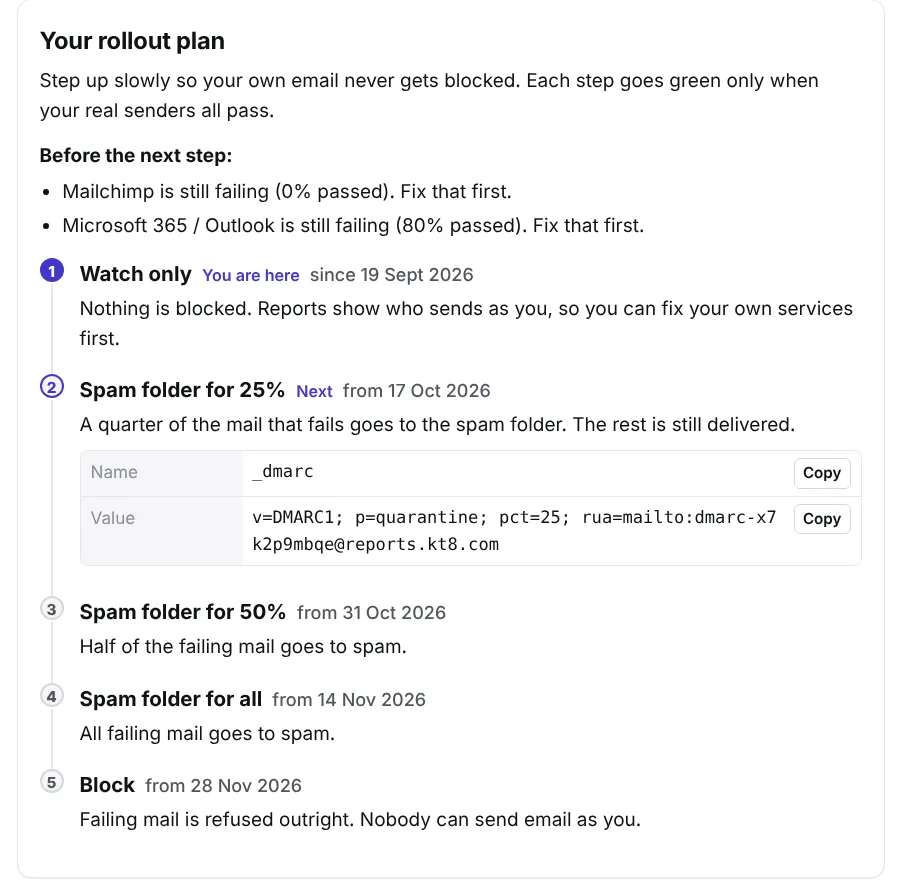
From watching to blocking.
Each level sends a bit more of the mail that fails DMARC to spam, so you can catch a missed sender early, while only part of the failing mail is affected. The timings are a guide: we only suggest the next level when your real senders all pass.
| Level | Your record says | What happens | Usually |
|---|---|---|---|
| 1. Watch only | p=none | Nothing is blocked. Reports show who sends as you, so you can fix your own services first. | Weeks 1 to 4 |
| 2. Spam folder for 25% | p=quarantine; pct=25 | A quarter of the mail that fails goes to the spam folder. | Weeks 5 and 6 |
| 3. Spam folder for 50% | p=quarantine; pct=50 | Half of the mail that fails goes to spam. | Weeks 7 and 8 |
| 4. Spam folder for all | p=quarantine | All mail that fails goes to spam. | Weeks 9 and 10 |
| 5. Block | p=reject | Mail that fails is refused outright. Nobody else can send email as you. | From month 3 |
No guessing when it’s safe.
Each step only goes green when your real senders all pass. Until then, we list what’s holding you back, such as “Mailchimp is still failing. Fix that first.”
- The exact record for the next level, ready to copy.
- An email when the next step is due, if you switch it on.
- If your DNS is with Cloudflare, we can change the record for you in one click.
Next step record
Name: _dmarc
Adding a new service later.
Once you block, any new service you start using must be set up in your DNS before its mail gets through. Our alerts tell you the day a new sender appears or one of yours starts failing, so you can fix it before customers notice.
New sender
Someone new starts sending email as your domain.
Your mail failing
A sender that’s yours starts failing DMARC.
Frequently asked questions.
Will DMARC stop my own email being delivered?
Not if you follow the plan. New domains start in watching mode (p=none), which blocks nothing. We only suggest the next level once your own email passes.
Can I go faster?
Yes. If every sender of yours already passes, you can move up whenever you like. The timings are only a guide.
What about subdomains?
Your DMARC record covers subdomains too, unless it says otherwise. We keep any other settings already in your record, such as sp, when we give you the next one.
Everything else that comes with KT8 DMARC.
No card needed. We’ll email you 3 days before your trial ends.