Masked email: dedicated email aliases for every website
Give every website a unique email address and cut off spam at the source.
Masked email is the latest feature in KT8 Mail. Whenever you register for a service, store, or newsletter, you can generate a unique email alias on your custom domain instead of exposing your primary address. Incoming messages route to your inbox as normal. If an alias starts receiving unsolicited mail, you can deactivate it instantly or set it to expire automatically, keeping your personal address hidden.
Already using KT8 Mail? Masked email is live in version 1.55. Upgrade to the latest build, enable it for your domain in administrative settings, and access it under Settings › Masked email.
Why your primary address needs protection
Most people rely on a single primary email address across hundreds of platforms—from online banking and retail to public subscriptions. When a service provider suffers a data breach or sells its customer directory, your main address gets harvested and targeted by spam networks for years.
Masked email isolates your identity. Because every site receives a unique alias, a compromised address affects only that single account. If a service leaks your details, you can revoke access to that alias without changing your login everywhere else.
Key capabilities
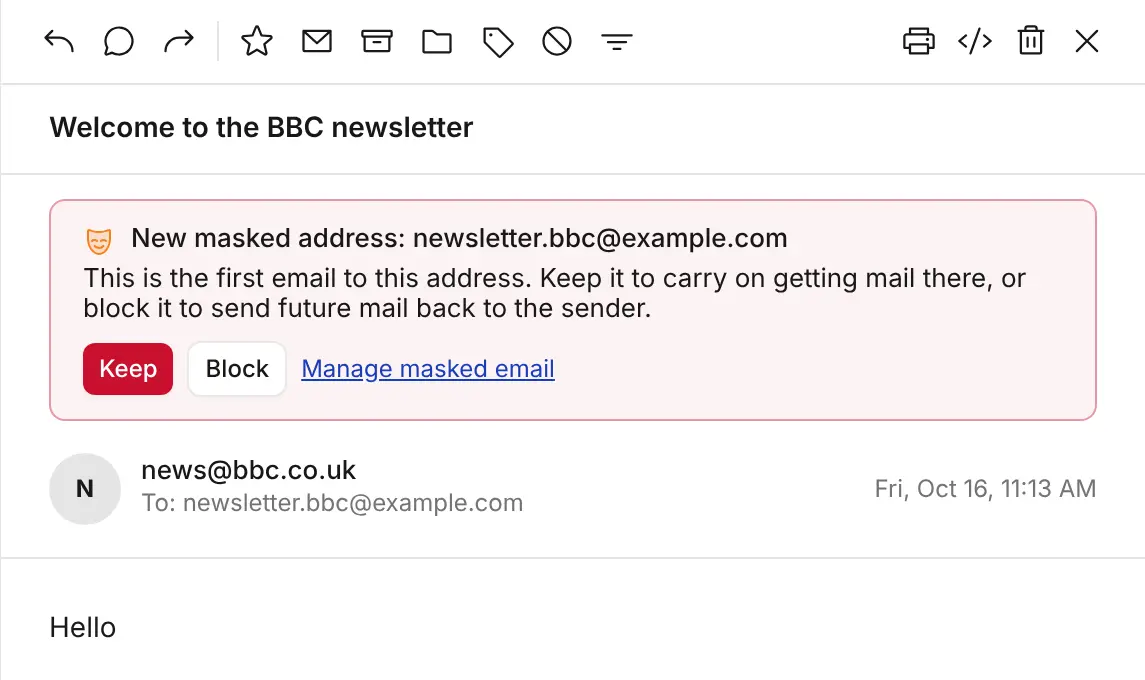
- On-the-fly alias creation: Generate custom addresses as you sign up online. Approve or block new aliases the moment the first incoming message lands.
- Automated alias expiration: Set aliases to auto-deactivate on a specific date, after a set duration, or immediately upon receiving their first email.
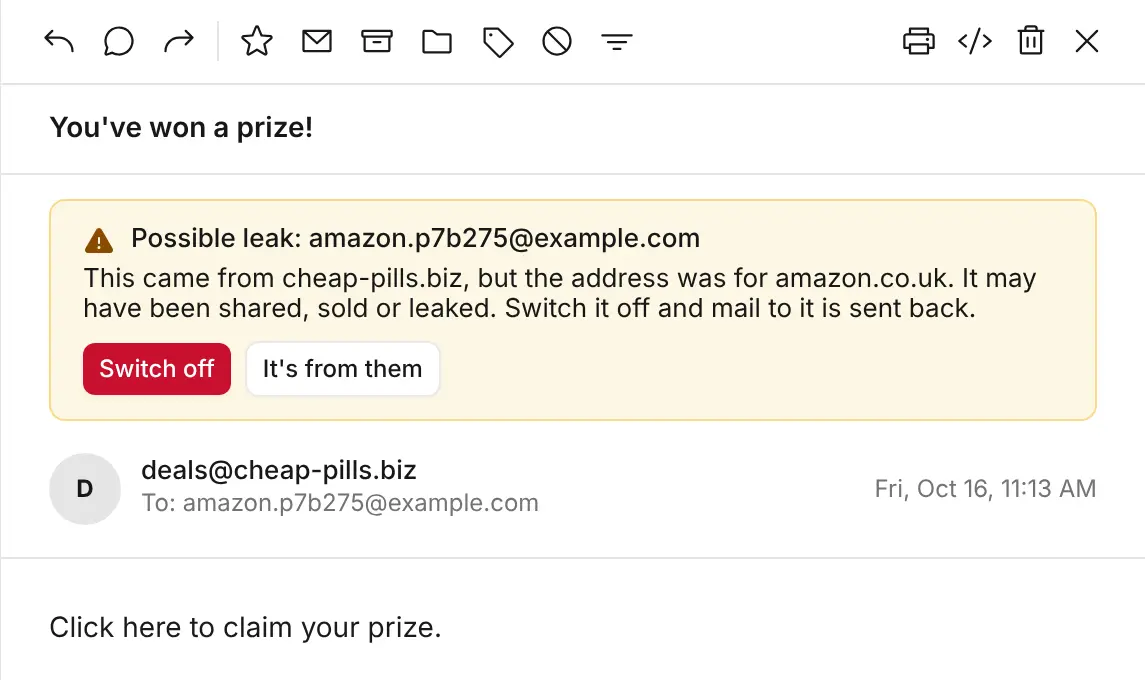
- Data breach & leak detection: Instantly identify compromised services—KT8 Mail monitors sender origins and flags messages sent to an alias from unauthorised domains.
Two ways to generate aliases
1. Manual creation in Settings
Navigate to Settings › Masked email, enter the service name (e.g. amazon.co.uk), and click Make address. KT8 Mail generates an isolated alias—such as amazon.p7b275@yourdomain—ready for insertion into any registration form. The random suffix makes your other active addresses hard for third parties to guess.
2. On-the-fly alias provisioning
You don't need to open your email client ahead of time. When filling out a form online, simply enter a new address pattern on your domain (e.g. shop.anything@yourdomain). Upon receiving the first incoming message, KT8 Mail prompts you to Keep or Block the new alias. To skip confirmation prompts, enable Keep new ones without asking.
Self-expiring aliases
For temporary interactions—such as one-off file downloads, event registrations, or short-term trials—you can configure auto-expiration rules:
| Expiration policy | Ideal use case |
|---|---|
| Never | Essential accounts and long-term service subscriptions |
| After first email | One-time passcodes, activation links, and single asset downloads |
| 1, 7, or 30 days | Free trials, short-term bookings, and promotional offers |
| Fixed date | Event tickets, seasonal access, or project-based work |
When an alias expires or is manually deactivated, incoming messages trigger a standard bounce response (NDR) to the sender stating: "This address is no longer in use." Messages are rejected at the server level and never reach your inbox.
Automated breach tracking
Every incoming message displays its destination alias clearly in your thread list. KT8 Mail maintains a mapping between each alias and its intended service. If a third party sends mail to an alias assigned to a different company, KT8 Mail displays a Possible leak alert above the message header.
With one click, you can choose Switch off to revoke the alias and bounce future delivery attempts, or It's from them to approve legitimate sub-processors (such as third-party delivery services).
Centralised alias management
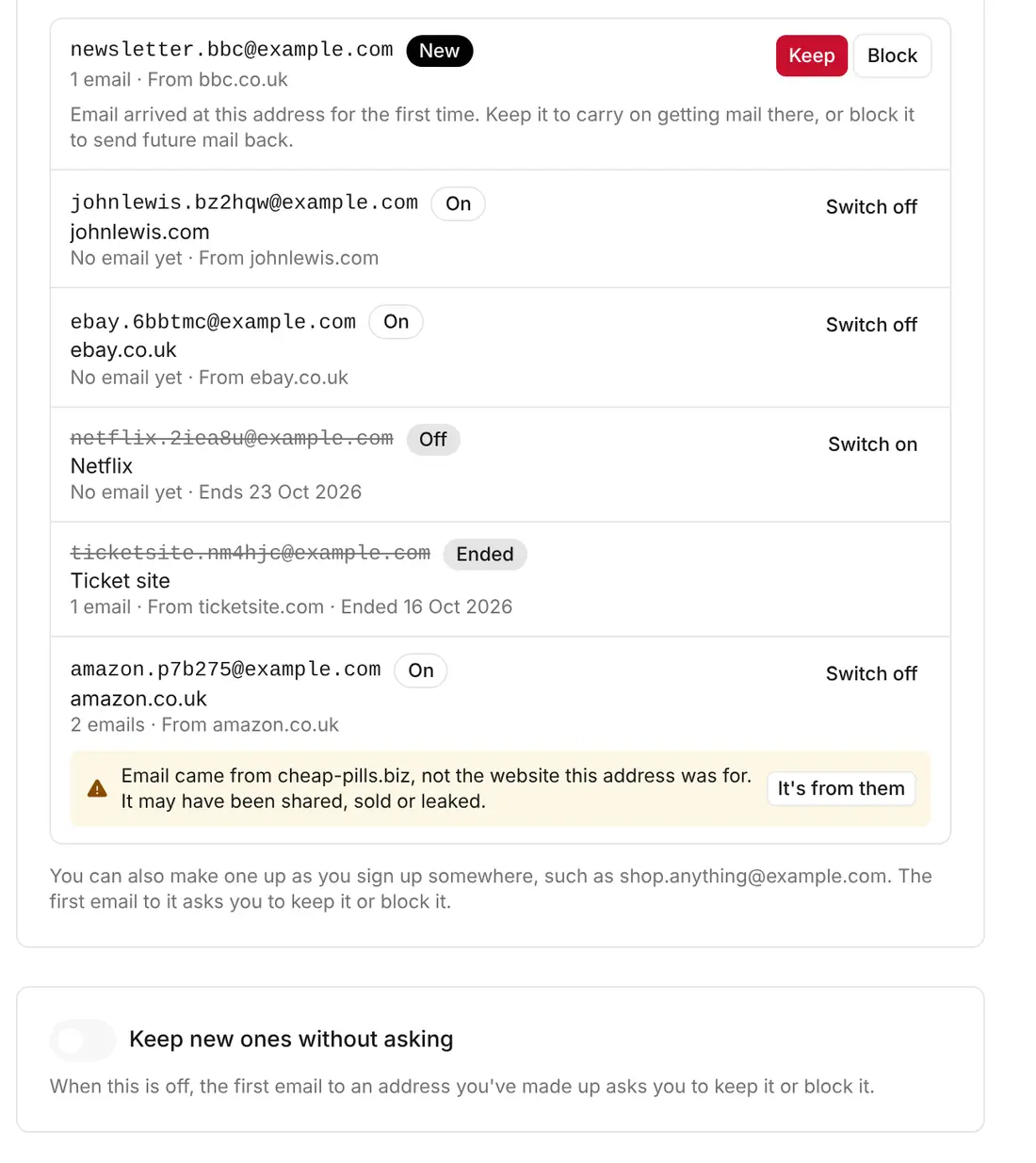
Manage your complete alias directory from a single dashboard in Settings. Monitor designated service labels, total message throughput, and expiration dates, with real-time controls to toggle active statuses on or off.
Privacy-preserving outbound replies
Replying to a message sent to a masked alias automatically sets your outbound From: header to match that specific alias, preserving your primary address. To prevent accidental identity leaks, KT8 Mail automatically strips your global email signature and suppresses automated out-of-office (auto-responder) messages for all masked alias communications.
Native domain ownership. Your masked aliases are provisioned directly on your custom domain via your Cloudflare infrastructure. There are no third-party email forwarding middleboxes, proxy delays, or secondary subscriptions required.
Enabling masked email
- An administrator opens the Mailboxes management view and selects the primary destination mailbox for masked routing.
- Under additional addresses, toggle Masked email to active for the selected domain.
- Authorised users will then see the Masked email tab appear under Settings.
Note: Enabling masked email on a domain replaces standard wild-card catch-all routing, as both rely on handling non-explicit mailbox delivery. On multi-domain setups, you can assign standard catch-all behaviour to one domain while running masked email on another.
New to KT8 Mail? Deploy the native automated installer to your Cloudflare account to launch full masked email capabilities alongside the complete mail suite.